

I came across a tip for developers using Claude Code on a Mac: exclude your code folder from Spotlight indexing to reduce background load. It is an interesting idea for Codex users too—but the size of any improvement depends on what your Mac is actually doing.
If Spotlight is busy processing a project that constantly changes, excluding that folder may reduce background indexing work. That is a hypothesis worth testing, rather than a promise that every coding session will suddenly become faster. I have not measured a before-and-after performance gain for this article.
Why a coding project might keep Spotlight busy
Apple explains that Spotlight maintains a search index and updates it as data changes. Initial indexing after setup or an update can take hours or days; later incremental updates are usually faster. Apple’s explanation of Spotlight indexing.
Development can generate a lot of file changes: dependency installation, build output, generated assets, logs, and repeated test runs. It is reasonable to suspect extra indexing work when those files are eligible for Spotlight indexing. How much work happens depends on the project, file types, existing exclusions, and macOS.
This is about the activity around the agent as well as the agent itself. If an AI assistant runs a build, those build files can change whether the command came from Codex, Claude Code, Xcode, or you.
Check the load before changing anything
Open Activity Monitor, choose View → All Processes, and select the CPU tab. Sort by % CPU. Apple documents how to inspect processes in its Activity Monitor guide.
During the slowdown, look for indexing-related processes such as mds, mds_stores, and mdworker_shared. A brief spike is not enough to diagnose the cause. Observe what stays busy during your normal workflow, including compilers, test runners, your editor, and the coding assistant.
High indexing activity alone does not identify which folder is responsible. If a compiler is using most of the CPU and Spotlight is quiet, excluding your repository is unlikely to address that bottleneck.
Exclude a project folder from Spotlight
- Open the Apple menu → System Settings.
- Select Spotlight in the sidebar. Some macOS versions call it Siri & Spotlight.
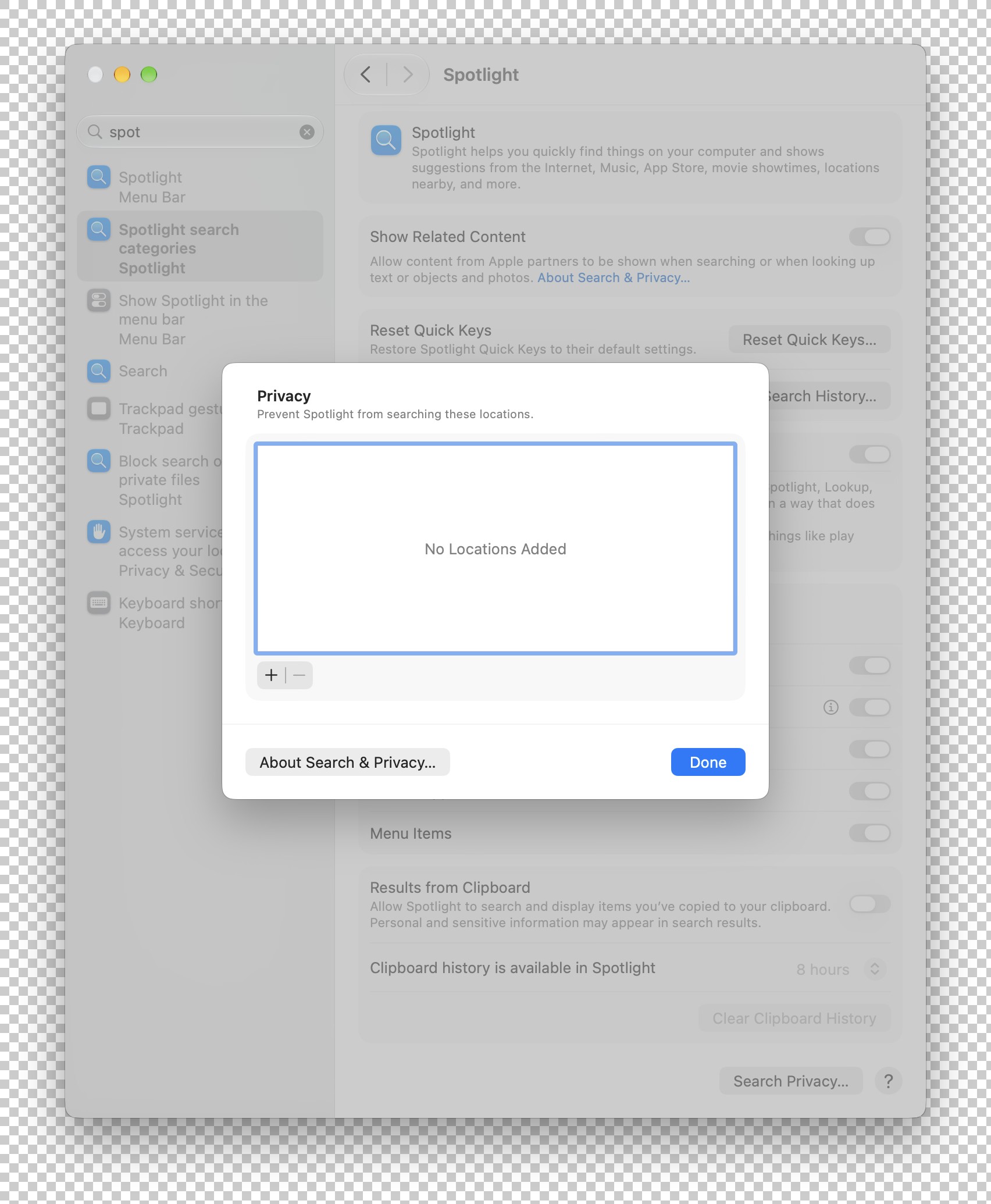
- Scroll down and click Search Privacy, or Spotlight Privacy on some versions.
- Click + and choose the project folder. You can also drag a folder from Finder into the list.
- Confirm the selection and click Done.
Leave the folder in the exclusion list for this experiment. Removing it again is the undo step, not part of excluding it. Apple describes the folder controls in Prevent Spotlight searches in specific folders or disks.
Which folder should you choose?
Start with one active repository, rather than your whole Home folder or disk. For example, if the project is ~/Developer/MyApp, exclude that folder first.
If you still want Spotlight to find source files, consider excluding only a noisy generated-output folder instead. Examples to investigate include a project’s build, dist, or node_modules directory. These are candidates, not a universal list that every developer should exclude.
Excluding a parent folder also affects what Spotlight can find beneath it. Choose a scope you are comfortable losing from system search.
Alternative: give the folder a .noindex suffix
Yes—appending .noindex to a folder’s name is an established way to exclude its contents from Spotlight indexing. For example, MyApp becomes MyApp.noindex. The suffix convention is documented in Metric Halo’s application manual and described in Howard Oakley’s Spotlight exclusion investigation. Apple’s current user-facing instructions use Search Privacy, which remains the main method in this guide.
This means renaming the folder itself, not placing an empty file called .noindex inside it. Do not confuse it with the older .metadata_never_index marker-file technique, which Oakley reports no longer works reliably in recent macOS.
For an existing project, close active agent sessions and builds, select the folder in Finder, press Return, and append .noindex to its name. Reopen the project from its new location. Renaming changes its path: check editor workspaces, scripts, and other saved references. Keep tool-managed directory names such as node_modules unchanged; use Search Privacy for those instead.
For a fresh scratch workspace, you can create a new folder in Terminal:
mkdir -p "$HOME/Developer/Scratch.noindex"This creates a folder; it does not move your existing projects. To undo the naming method, remove the suffix, restore any changed path references, and allow time for indexing. Verify the effect on your macOS version; it is not a promise of a measurable performance gain.
Using this with Codex
For Codex working in a local checkout on your Mac, the Spotlight exclusion is a macOS setting; there is no Codex-specific toggle to enable for this experiment. Codex CLI works against a local repository, as described in the official CLI guide.
After changing the setting, repeat an ordinary task: a small code edit, a build, or a test run. Check that the agent can still open and search the relevant files. Exclusion does not delete files or change their filesystem permissions, but tools that specifically depend on Spotlight results may stop discovering excluded content.
If the work runs on a remote machine, changing Spotlight on your Mac does not change indexing on that machine. Keep the test focused on local work.
Using this with Claude Code
Use the same macOS steps for Claude Code running in a local project. Repeat the same task and compare the activity you observed before the exclusion.
Claude Code also has its own performance considerations. Anthropic recommends checking large codebases, considering large build directories in .gitignore, restarting between major tasks, and investigating plugins, MCP servers, or hooks if needed. These address different sources of load. Claude Code troubleshooting.
A Spotlight exclusion and a Git ignore rule do different jobs. Adding a build directory to .gitignore is not a Spotlight exclusion. Putting a folder in Search Privacy is not an instruction for your AI assistant to ignore its contents.
How to tell whether it helped
Try a small, repeatable comparison:
- Before the exclusion, record a few minutes of CPU activity while doing a typical edit/build/test cycle.
- Add only the selected folder to Search Privacy.
- Allow background activity to settle, then repeat the same cycle under similar conditions.
- Compare indexing-process activity, responsiveness, and build or test duration across several runs.
A second build can be faster simply because its caches are warm. Model response times can vary too. Neither is proof of a Spotlight improvement. Record what changed and what did not; “no meaningful difference” is a useful result.
Do not force-quit indexing services or disable indexing for the entire disk just to test this tip. A targeted folder exclusion makes the tradeoff easier to understand.
The tradeoff—and how to undo it
Excluded content will no longer appear in Spotlight searches; Finder searches that rely on its index can also be affected. Keep important documents searchable if you use system search to find them.
To undo the change, return to Search Privacy, select the folder, click –, and choose Done. Spotlight can index it again, so allow time for search results to return. Apple’s indexing guide explains the reindexing process.
For a busy local codebase, this is a practical experiment: identify the load, exclude a narrow folder, and measure the same workflow again. Keep the setting if the benefit is useful and the loss of system search is acceptable.